Failing APIs
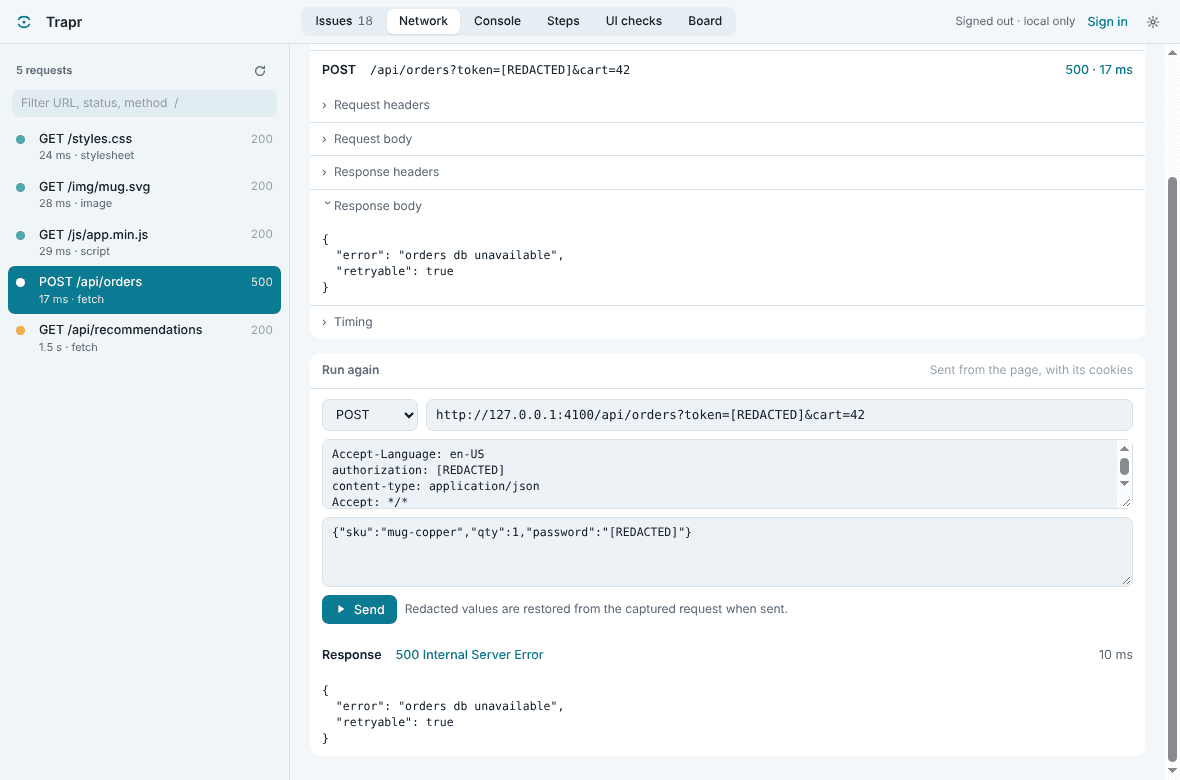
Trapr lists failed, errored, slow and stuck requests with their request and response details, and lets you run a request again.
What becomes an issue
- Failed request: an HTTP 4xx or 5xx response. A 5xx is Critical, other 4xx are Major.
- Network error: the request did not get a response at all.
- Slow request: finished after the slow threshold, 1000 ms by default.
- Pending request: still waiting after the pending threshold, 5000 ms by default. It updates in place when it finishes.
Details
Open an issue to see the method, URL, headers, body, response and timing. Values such as tokens and cookies are hidden until you choose Show secrets, and never go into reports or exports.
Run again
The Network view can send a request again from the page, with its cookies, after you edit the method, URL, headers or body. Throttle the network with Fast 3G, Slow 3G or Offline, and reload without cache.
Thresholds
Change the thresholds in Settings › Capture. Without deep capture, Trapr sees fetch and XHR calls from the page, with less detail.