Getting started
Trapr watches the tab you work in and keeps every error, failed request and slow call in one list. Install it, pin it, and open the Trapr window.
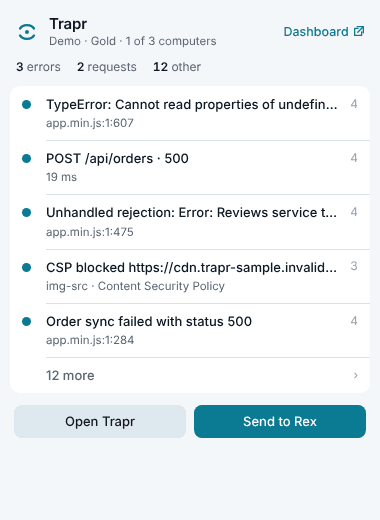
Trapr is a browser extension. It watches the tab you are on and catches bugs as they happen: uncaught exceptions, rejected promises, console errors, failed and slow requests, CSP and mixed-content problems, accessibility problems, and layout problems such as a button covered by another button.
Repeats are grouped into one issue with a count. For each issue you can find the cause, run the request again, and hand a redacted report to Rex or Ingot. Nothing leaves your browser until you send a report.
The first five minutes
- Install Trapr in Chrome or Safari.
- Pin Trapr in the toolbar. A red badge shows the number of open issues on the current tab.
- Click the icon for the quick view. Choose Open Trapr for the full window, or press Alt+Shift+M to open it in the side panel.
- Reload the page you are testing so Trapr can watch it load.
- Optional: sign in with Ingot to see your plan and use the hand-off actions. The local monitor works without signing in.
Shortcuts
- Alt+Shift+T opens the quick view.
- Alt+Shift+M opens Trapr in the side panel.
- In the window, press ? for the keyboard list. Number keys switch views, J and K move through issues, and / filters.
Where to go next
Read Issues board to see how issues are ranked and exported, and Settings to choose what Trapr catches.