Issues board
The Board lists every issue on the tab, grouped by severity, with a how-to-fix line, filters and export to CSV, Excel, PDF or JSON.
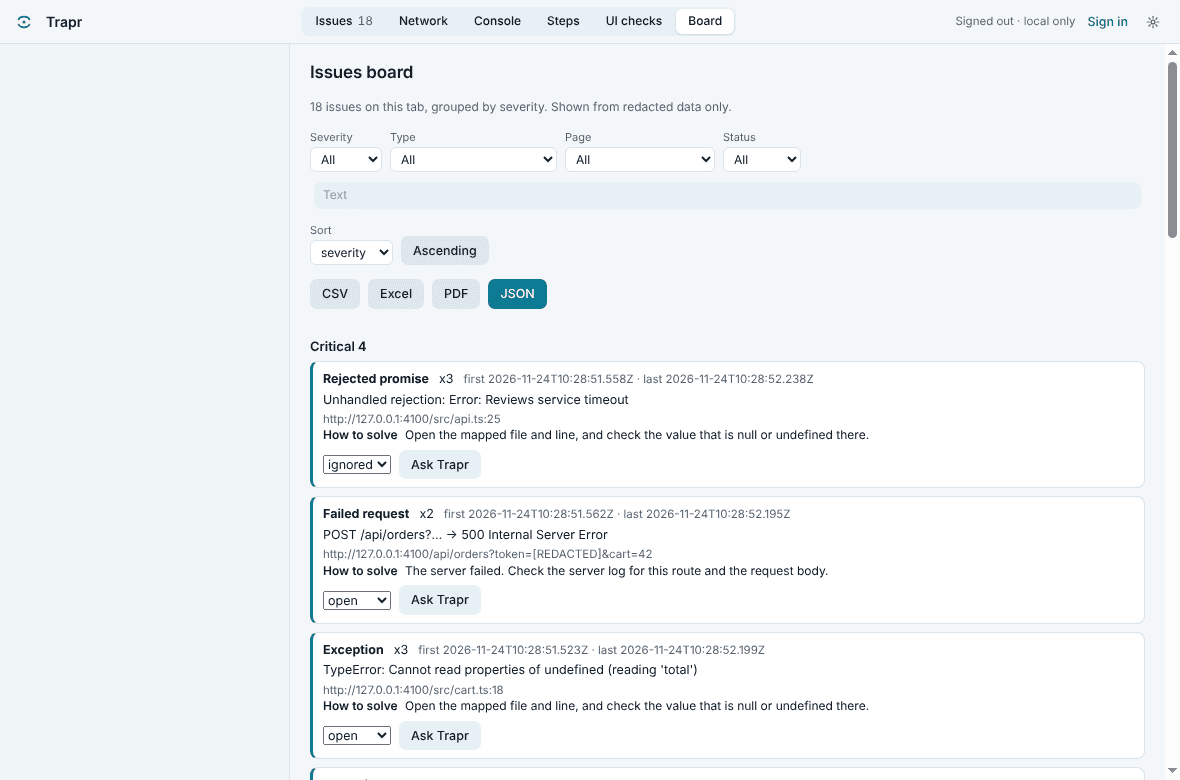
Open the Board tab in the Trapr window. It lists every issue on the tab, grouped by severity. It is built from redacted data only.
Severity
- Critical: uncaught exceptions, rejected promises and requests that failed with a 5xx.
- Major: other 4xx and transport errors, console errors, CSP and mixed-content violations, and covered controls.
- Minor: slow or pending requests, content that overflows the screen, and accessibility problems.
- Info: console warnings and anything else.
What a row shows
The type, the message, where it happened (the mapped file and line when a source map is loaded, otherwise the top stack frame or the URL), the count, when it was first and last seen, a How to solve line, and a status: open, ignored or fixed. Statuses are stored in this browser. Ask Trapr opens the issue in the Issues view with the Ask panel.
Filter and sort
Filter by severity, type, page, status or text. Sort by severity, count, last seen or type.
Export
Export the rows as shown to CSV, Excel (.xlsx), PDF or JSON. The CSV has a How to solve column. The PDF is a printable report with the summary counts and a table. Every export is built from the redacted rows, so tokens, cookies and passwords do not reach the file. Set the default format and screenshots in Settings › Export.